
Example SMS sign-up form for 10DLC
Carriers approve your texting campaign only after they can see exactly where and how your customers agree to receive texts, so the registration asks for the page address of your sign-up form, where on the page it is, and ideally a screenshot link.
See a working example
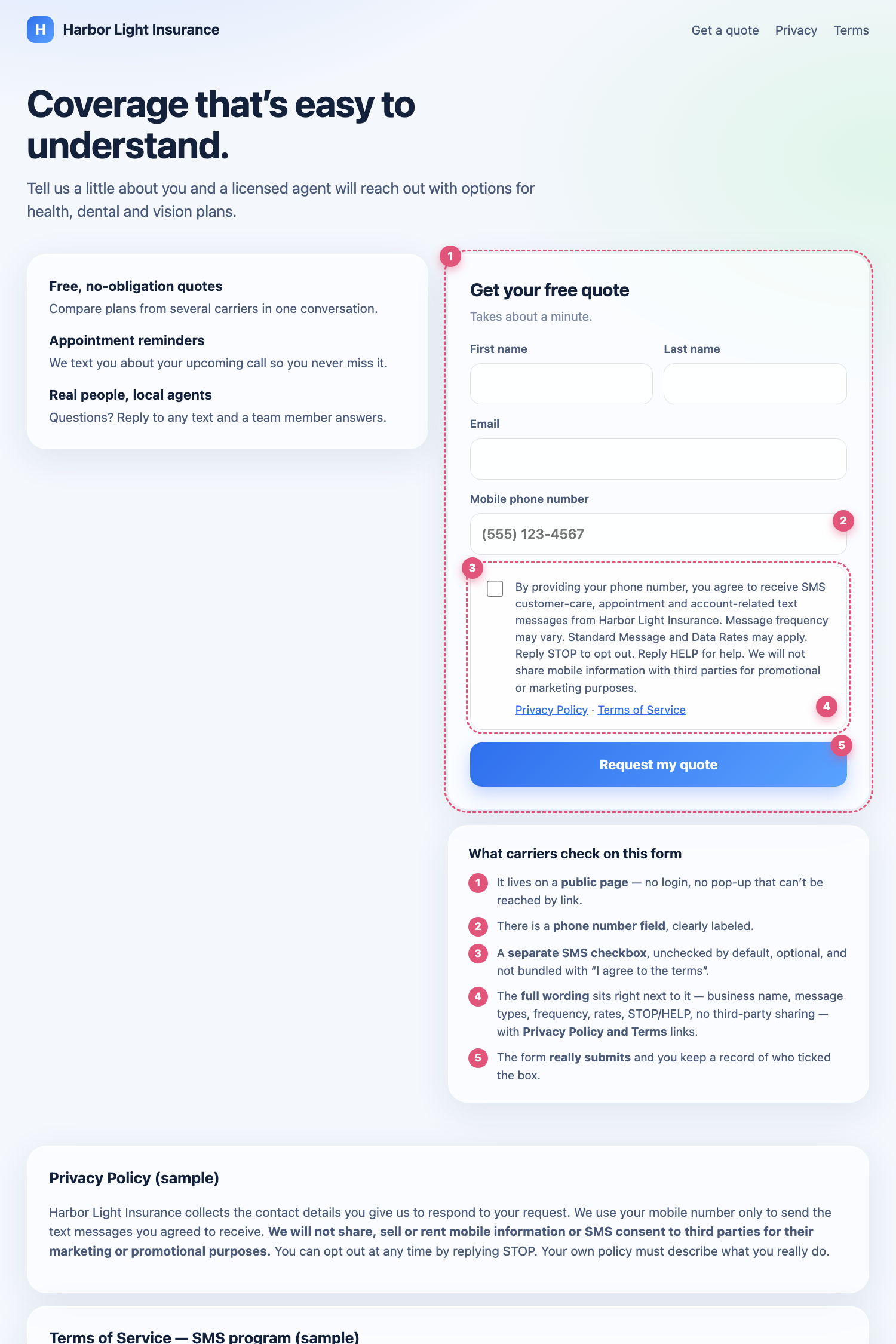
We built a sample website for a made-up business, Harbor Light Insurance, with a compliant sign-up form. Open it, look at how the form is laid out, and tick Show what carriers check in the corner to see the five things reviewers look for.
- Live example: Harbor Light Insurance sample form
- Same page with the markers already on: open with markers
What your form needs
A public page. Anyone with the link can open it — no login. A pop-up is fine, but then you must add a screenshot.
A phone number field, clearly labeled.
A separate SMS checkbox that is unchecked by default, optional (the form can be submitted without it), and not combined with "I agree to the terms".
The full wording next to the checkbox, with your own business name and message types:
By providing your phone number, you agree to receive SMS [the kinds of messages you send] from [your business name]. Message frequency may vary. Standard Message and Data Rates may apply. Reply STOP to opt out. Reply HELP for help. We will not share mobile information with third parties for promotional or marketing purposes.
If you send promotions, also say so: You are opting into marketing texts from [your business name]. The Text messaging setup card shows this wording filled in for your business.
Links to your Privacy Policy and Terms of Service beside the checkbox. They must open real pages, and your privacy policy must state that you do not share mobile information with third parties for marketing.
A working submit button — the form must actually send your customer's details to you, and you should be able to show who ticked the box.
Copy-and-paste starter
Paste this into your site's HTML (or hand it to whoever builds your website) and replace the words in [BRACKETS]. It is deliberately plain so it works on any site.
<form action="/your-form-handler" method="post">
  <label>First name <input name="first_name" required></label>
  <label>Last name <input name="last_name" required></label>
  <label>Email <input type="email" name="email" required></label>
  <label>Mobile phone number <input type="tel" name="phone" required></label>

  <!-- SMS consent: its own box, NOT checked, NOT required -->
  <label>
    <input type="checkbox" name="sms_consent" value="yes">
    By providing your phone number, you agree to receive SMS [YOUR MESSAGE TYPES]
    from [YOUR BUSINESS NAME]. Message frequency may vary. Standard Message and Data
    Rates may apply. Reply STOP to opt out. Reply HELP for help. We will not share
    mobile information with third parties for promotional or marketing purposes.
    <a href="/privacy">Privacy Policy</a> · <a href="/terms">Terms of Service</a>
  </label>

  <button type="submit">Request my quote</button>
</form>
What to enter in Ody
In Settings → Numbers → Text messaging setup → Campaign, choose A sign-up form on my website and fill in:
| Field | What to put | Example |
|---|---|---|
| Page address | The full public link of the page that holds the form | https://yourbusiness.com/contact |
| Where on the page | One sentence a reviewer can follow | The Get Your Free Quote form at the bottom of the home page |
| Screenshot link | A public link to a picture of the form (optional, recommended) | a Google Drive or Imgur link |
Then confirm that your live form shows the wording and checkbox described above. Ody writes the opt-in description that the carriers read from your answers.
How to make a screenshot link
- Open your sign-up page and scroll so the phone-number field and the full consent text are both visible. On a computer press Cmd + Shift + 4 (Mac) or Windows + Shift + S (Windows); on a phone take a normal screenshot.
- Upload the picture to Google Drive (right-click → Share → Anyone with the link → Viewer) or to Imgur (copy the direct link).
- Open the link in a private window to check it works without signing in, then paste it into the Screenshot link field.
Troubleshooting
- Rejected for "opt-in workflow needs more details" — the carriers could not tell where customers opt in. Click Edit & resubmit and give the page address, where on the page the form is, and a screenshot link.
- Rejected because the checkbox is required or pre-ticked — change your form so the SMS box is optional and unchecked, then resubmit.
- Rejected because the wording is missing parts — compare your form to the wording above; every sentence must be present, including your business name and the no-sharing sentence.
- The form only appears after a pop-up or login — add a screenshot link; reviewers cannot open it themselves.
- You do not have a form yet — add one first. Registering with a form that does not exist is rejected and you would need to start the review again.
Related articles
Frequently asked questions
Do I need a screenshot of my sign-up form?
It is optional in Ody but strongly recommended, and carriers require it if your form is a pop-up or sits behind a login. Take a screenshot of the form showing the phone-number field and the SMS consent text, upload it to Google Drive or Imgur, set it to anyone with the link can view, and paste that link into the registration.
What exactly must the SMS checkbox look like?
It must be its own checkbox, unchecked by default, optional (the form can be sent without it), and not combined with agreeing to terms. Next to it, show the full consent wording with your business name, the kinds of messages, message frequency, rates, STOP and HELP, and the no-sharing sentence, plus links to your Privacy Policy and Terms of Service.
I do not have a website form. What can I do?
Add a simple form to your website, or use a free form builder and link to it from your site, then use its public address. If customers opt in another way (verbally, on paper, or by texting you first), choose Another way in the registration and describe that one method, including where your number or sign-up is published.
Can I copy the example?
Yes. Copy the wording and structure, and replace the business name, message types, links and policies with your own. Your Privacy Policy must truthfully say you do not share mobile information with third parties for marketing.